Composer · Registry management · AI-assist roadmap
Creating, configuring, and maintaining clinical registries in one workspace
Digitizing a manual, multi-team configuration process for rare-disease registries
Pulse Infoframe supports complex registries across rare disease, oncology, and other clinical contexts. Each registry involves different populations, sites, roles, content, schedules, and operational rules — and setting one up meant spreadsheets, email chains, manual SQL, and a developer in the loop for almost every step.
The deeper problem was structural. As the platform grew, administrators needed more than a collection of settings screens: they needed a coherent way to find registries, understand their state, enter the right context, and manage each one through predictable modules. I led that work from research through dev handoff — the setup wizard, the module architecture behind it, and the administration model tying them together.
Approached with the Double Diamond
Overview
Research
Registry setup was not one workflow — it was a chain of dependent handoffs
Stakeholder interviews, an audit of the manual intake artifacts, and a time-and-step analysis across a full registry launch produced one reframing that changed the project. Teams described setup as a single process, but mapping it end to end across six roles — Registry Admin, Site Admin, Developer, DevOps, PI/Monitor, and Patient — showed ten stages where almost every one ended in a handoff, and most of those handoffs ended in someone running a script. The delay wasn't inside any team's work. It was in the seams between them.
Registry setup was not one workflow — it was a chain of dependent handoffs.
Duplicate entry
Site, protocol, and IRB details re-keyed across Excel, email, and CRF templates — every repetition a fresh opportunity for error.
Invisible status
No shared view of configuration state, so nobody could answer the one question that mattered: what is blocking this launch?
Manual handoff
Approvals and status lived in email chains, and half the configuration required a developer to run SQL by hand.
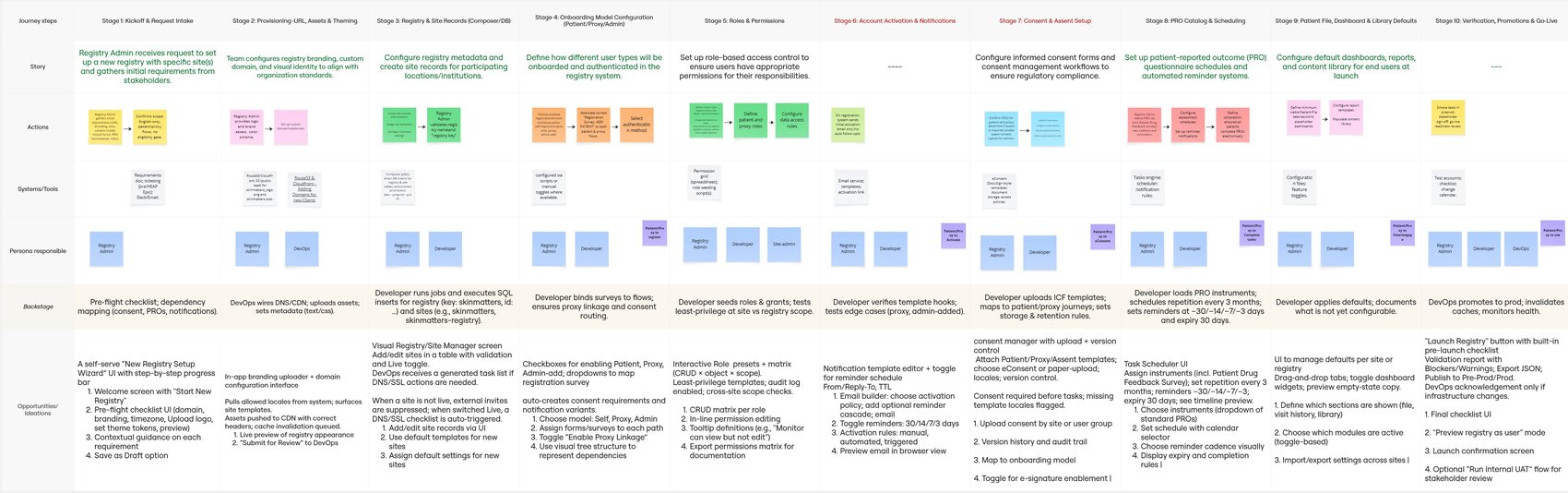

Three personas anchored the work — Clinical Project Coordinator, Data Manager, and Internal Admin — but the differentiating insight wasn't who they were. It was that their tasks were serially dependent, and nothing in the tooling made that visible.
Strategy
What a self-serve setup had to get right
The three failure patterns pointed to five opportunity areas: centralize and standardize configuration, introduce role-based guided workflows, add system-wide status visibility, automate form logic and validation, and make the whole thing traceable for compliance. Because this is a clinical product, I also set guardrails the solution could not violate — a wrong configuration here isn't friction, it's a regulatory exposure.
Modularize the setup process
Break end-to-end configuration into logical modules so each can be owned, completed, and returned to independently.
Align the UI with roles
Role-specific views so each person sees what they own, enabling collaboration without duplicated effort.
Build in smart feedback
Real-time validation and auto-save with visible saved states, to build trust and reduce mid-configuration drop-off.
Make progress visible
Persistent progress indication showing which modules are complete, in progress, or blocked — across the whole registry.
Administration model
The challenge wasn't adding more settings — it was creating a stable mental model for registry administration
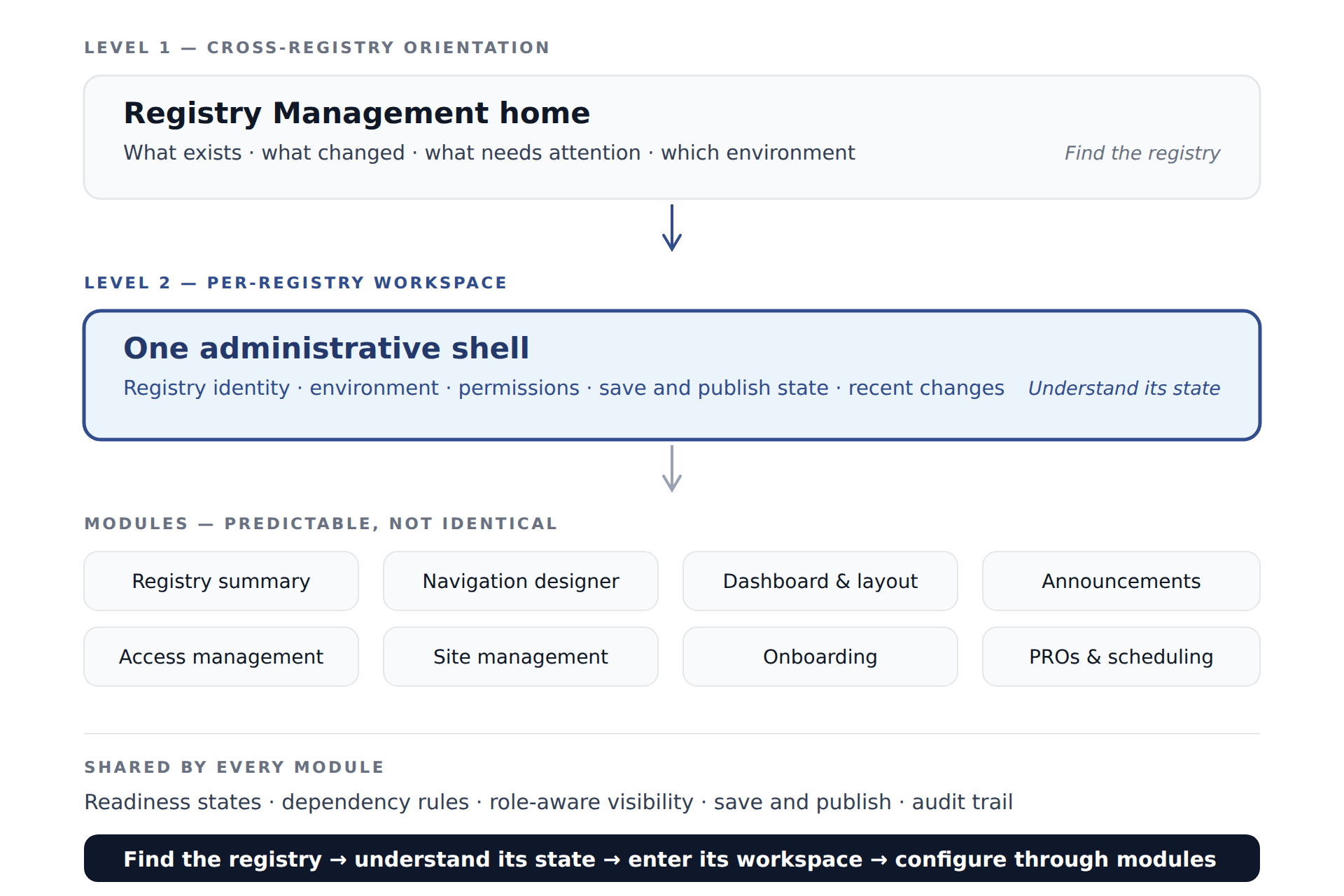
Without a shared model, every new administrative capability becomes another disconnected configuration page. Administrators would have to relearn where things live each time the platform grew — and the platform was growing.
I reframed the work around two levels of orientation. A cross-registry home answers what exists, what changed, and what needs attention. A per-registry workspace holds one registry's configuration in a consistent shell, with modules that differ in content but not in structure, states, navigation, or feedback.
Design reasoning
Three problems, three decisions
Each of the failure patterns from research resolved into a specific structural decision, and each decision produced a specific piece of the interface. This is the part of the work I'd want to be judged on — not that the screens look tidy, but that each one exists because of something the research found.
Duplicate information
The same site, protocol, and IRB details were entered repeatedly across systems, with no single authoritative source.
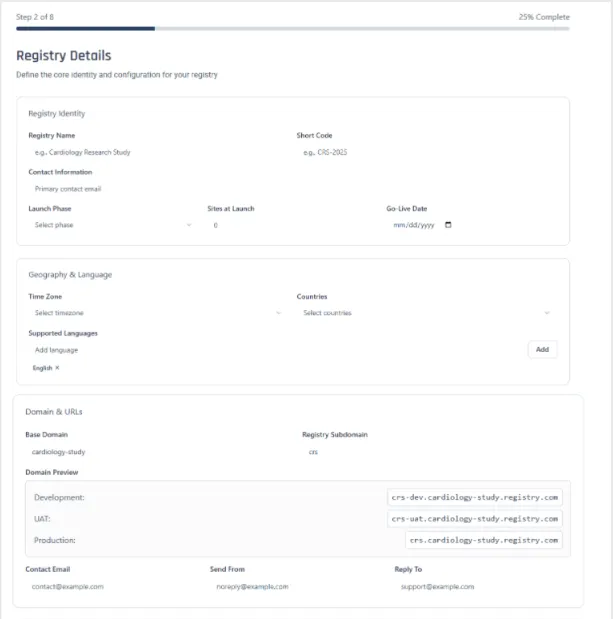
Reusable registry metadata
Identity, geography, domains, and communication channels are captured once at registry level and inherited by every site and environment beneath it.
No status visibility
Configuration state lived in people's heads and inboxes. Nobody could tell what was done, what was outstanding, or what was blocking launch.
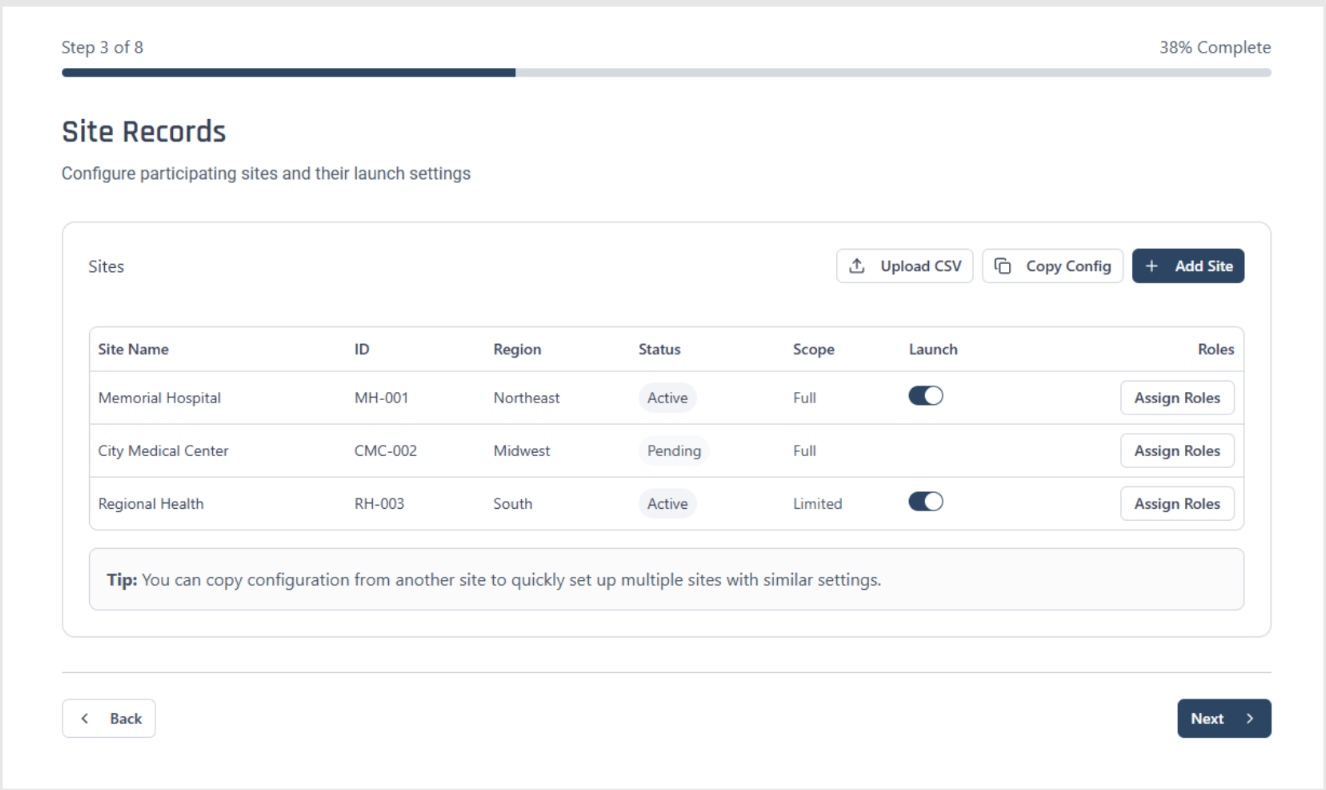
Persistent setup progress
A step indicator plus per-module readiness state that survives leaving and returning, so a half-configured registry is a legible state rather than an unknown one.
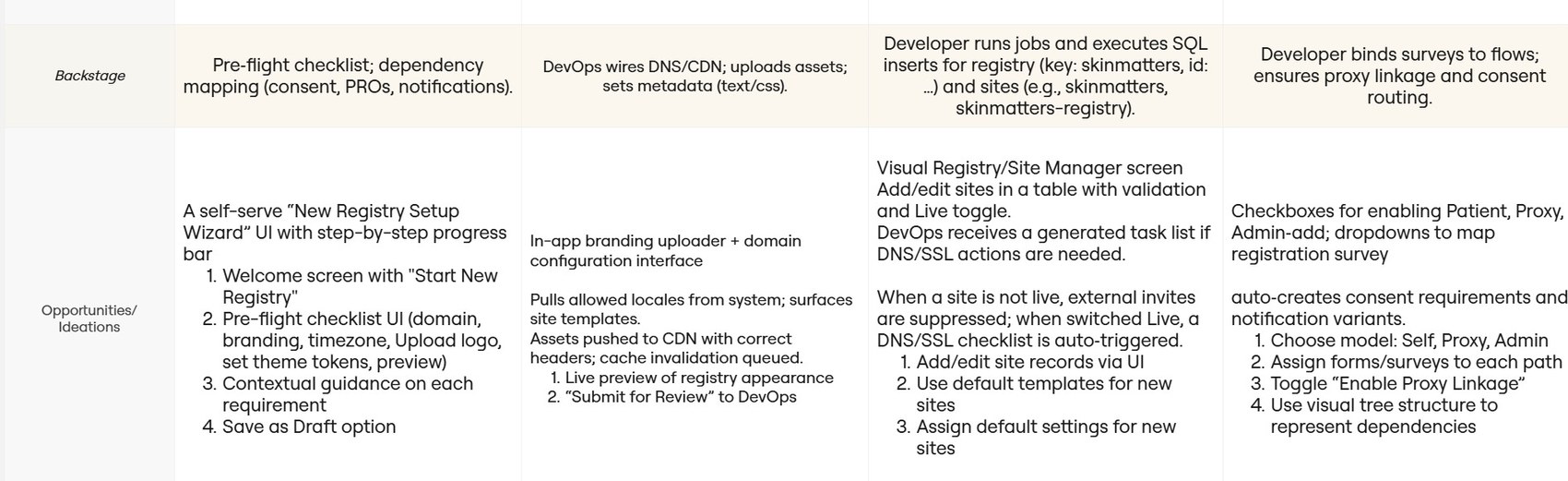
Complex hidden dependencies
Enabling one option silently created required work in another team's module — and the process relied on people simply remembering it.
Modular configuration with explicit dependencies
Each capability declares what it depends on. Turning something on surfaces the downstream requirement immediately, with a deep link to the module that resolves it.
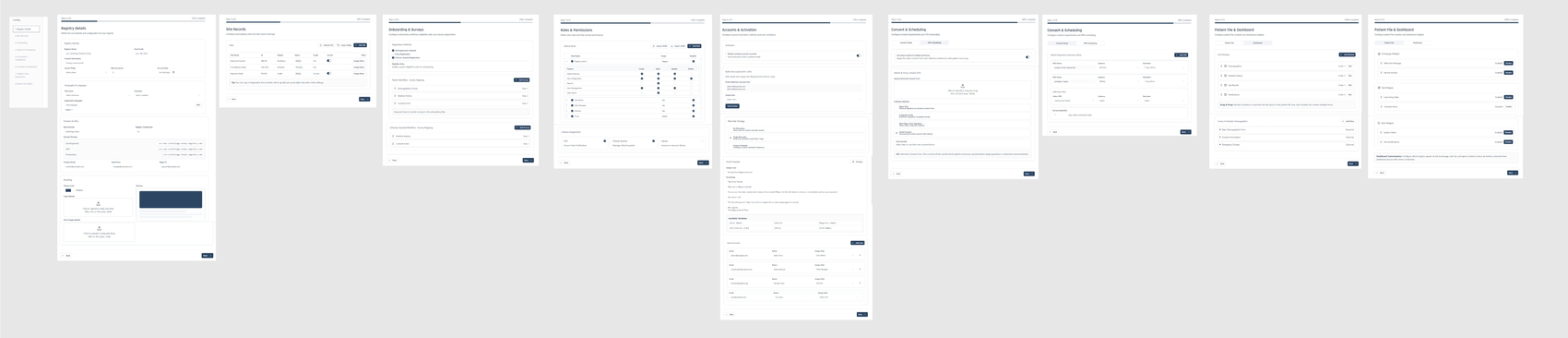
Ideation — low- to mid-fidelity
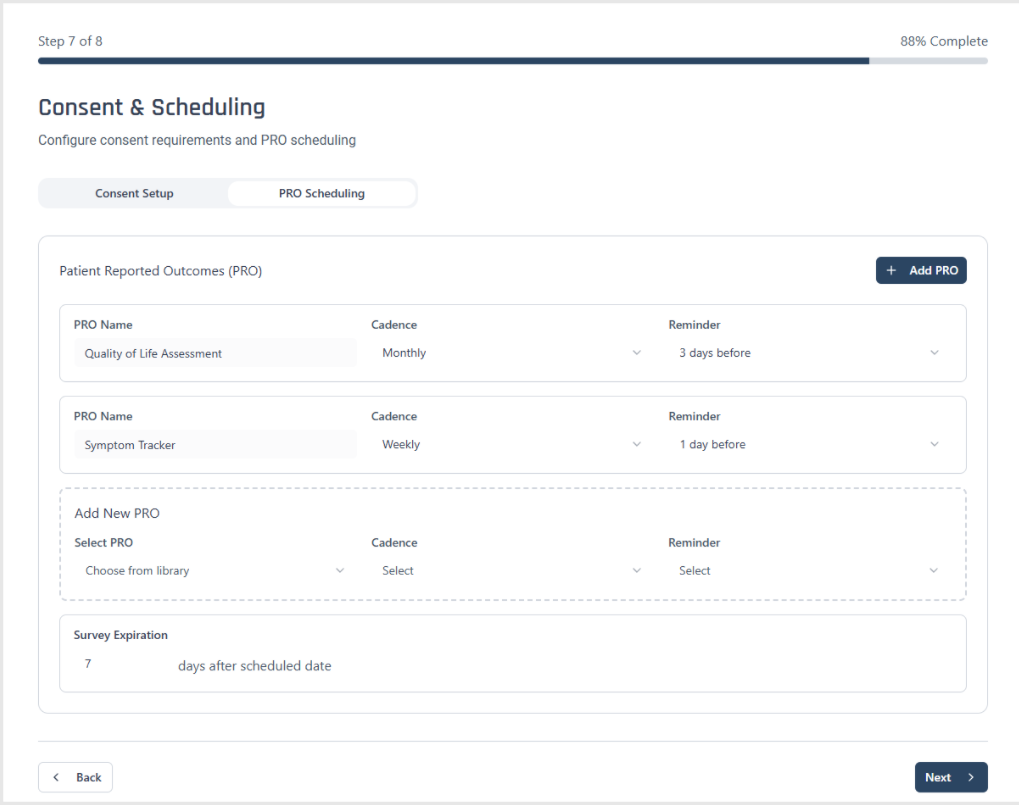
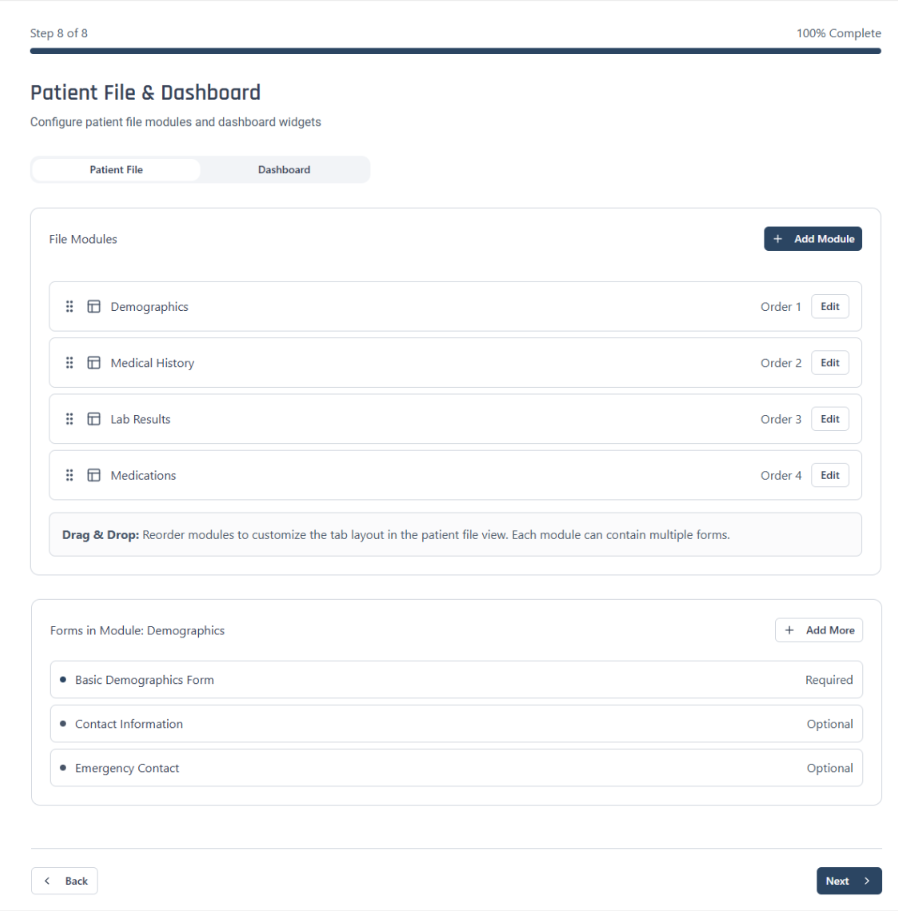
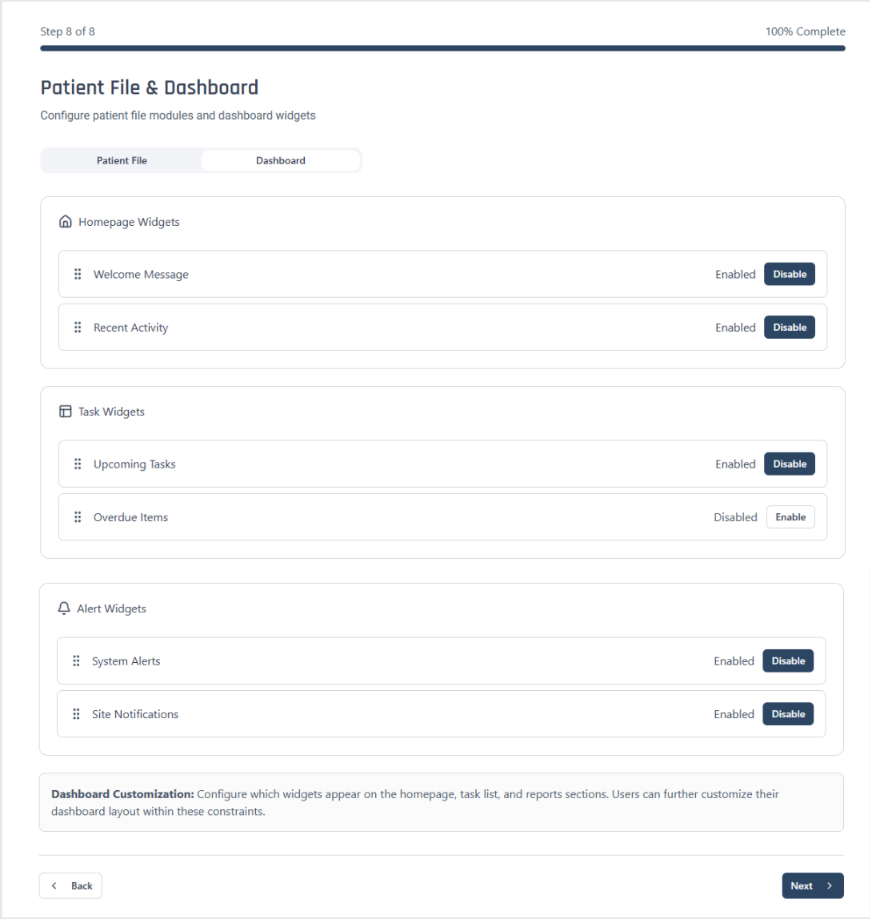
An eight-step guided registry setup
I moved from Miro flows into low- and mid-fidelity Figma prototypes, then into the full eight-step wizard. Each step is a self-contained module with its own validation, a persistent progress indicator, and the ability to save and return later — because in practice a registry is never configured in one sitting. Chunking the complexity followed progressive disclosure; branching logic and context-aware inputs kept irrelevant fields off the screen entirely.
Final design — the registry workspace
One home for every registry, one workspace per registry
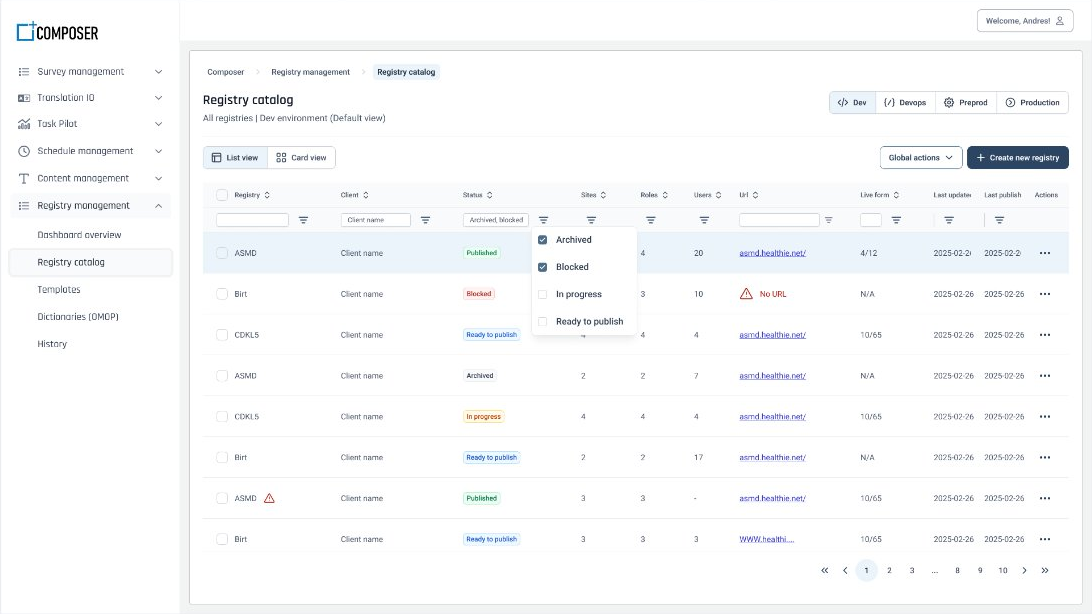
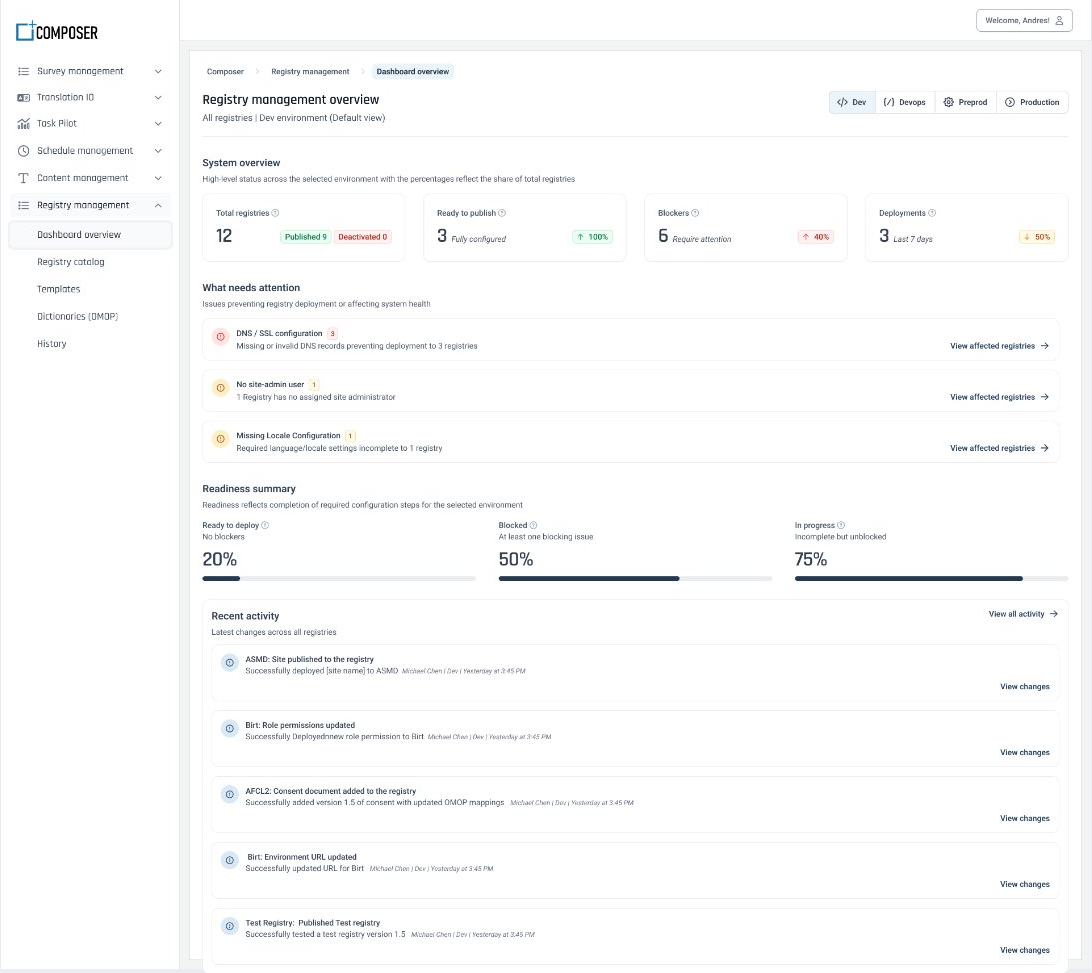
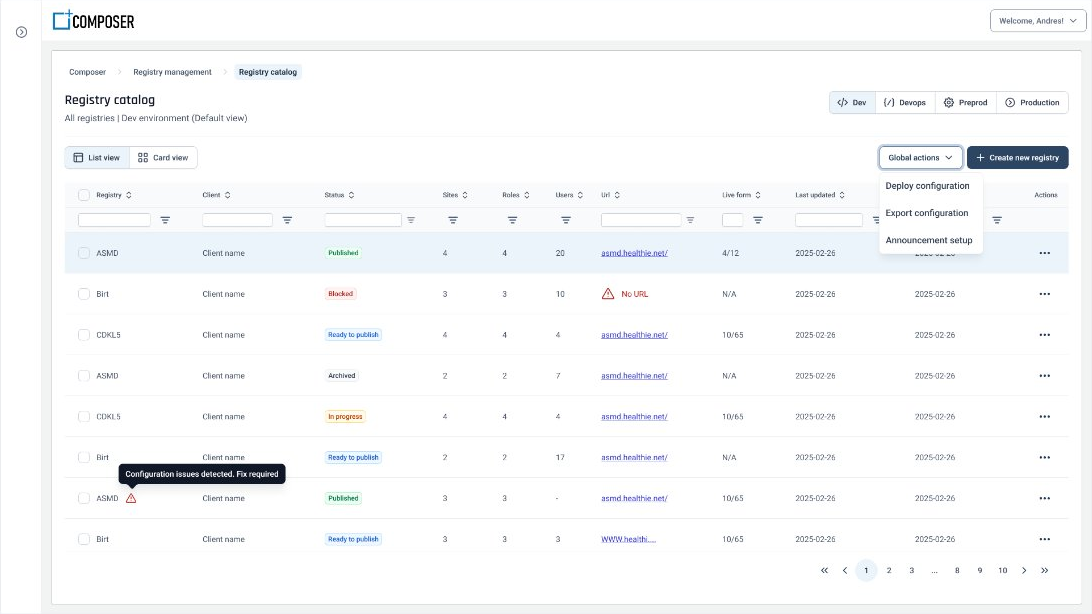
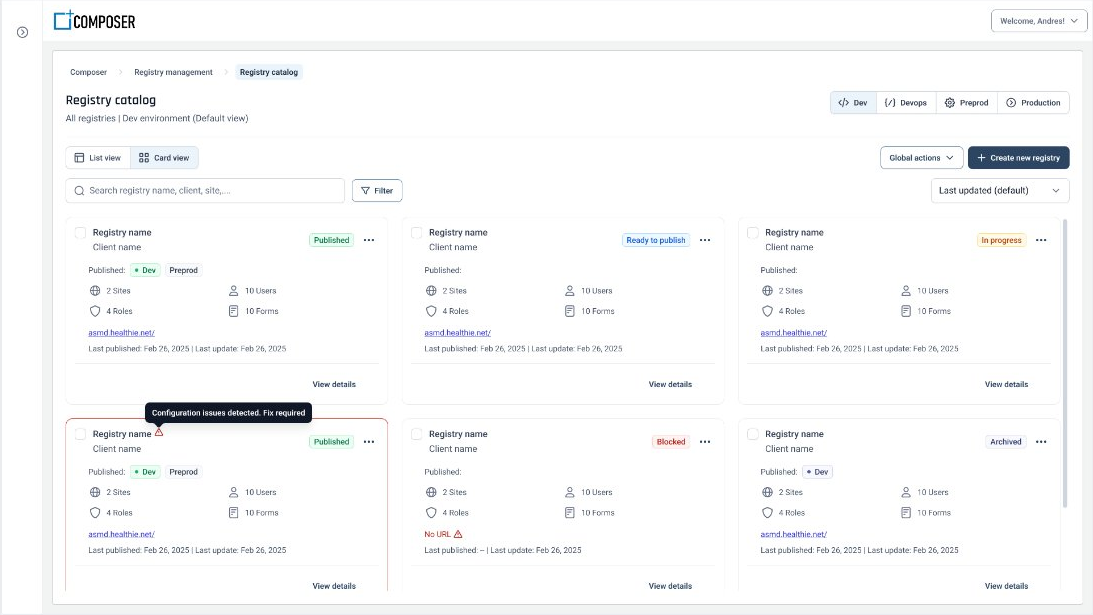
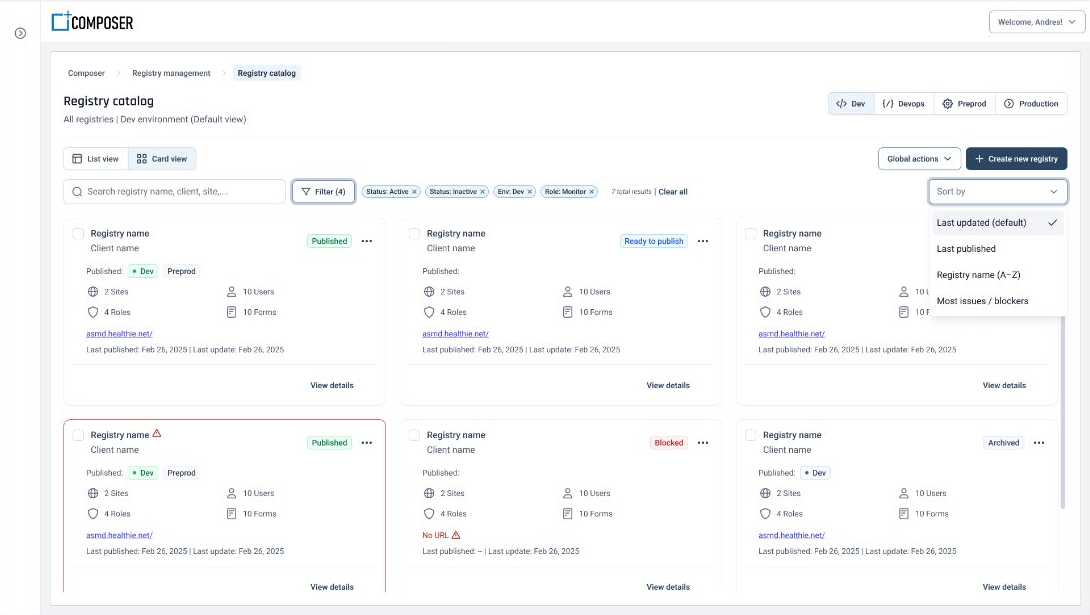
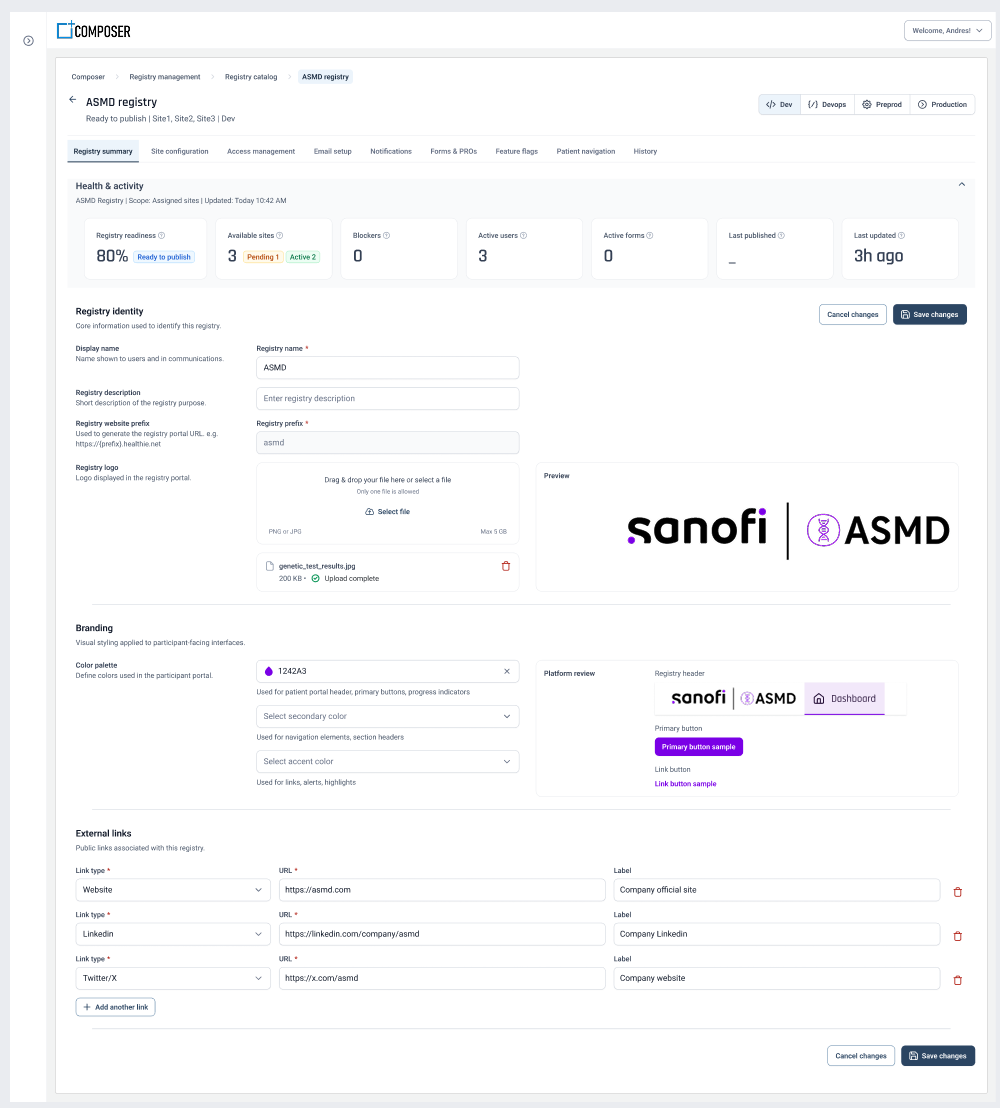
The wizard solves creating a registry. The bigger job was giving teams somewhere to live afterwards. The final design splits into two levels: a Registry Management home that lists every registry across all four environments with its status, and a per-registry workspace where configuration is organised into modules down the left rail. Environment is a first-class switch — Dev, DevOps, Preprod, Production — because the old process constantly lost track of which environment a change had actually landed in.
Catalog first
Every registry across every environment in one place, filterable by status, with quick actions and a card view for scanning.
Then a focused workspace
Enter a registry and configuration becomes modular: summary, sites, access, email, notifications, forms and PROs, feature flags, navigation, history.
Environment always visible
The environment switcher persists across the workspace, so it's never ambiguous which environment a change applies to.
Module architecture & specifications
Making dependencies the system’s job, not the user’s
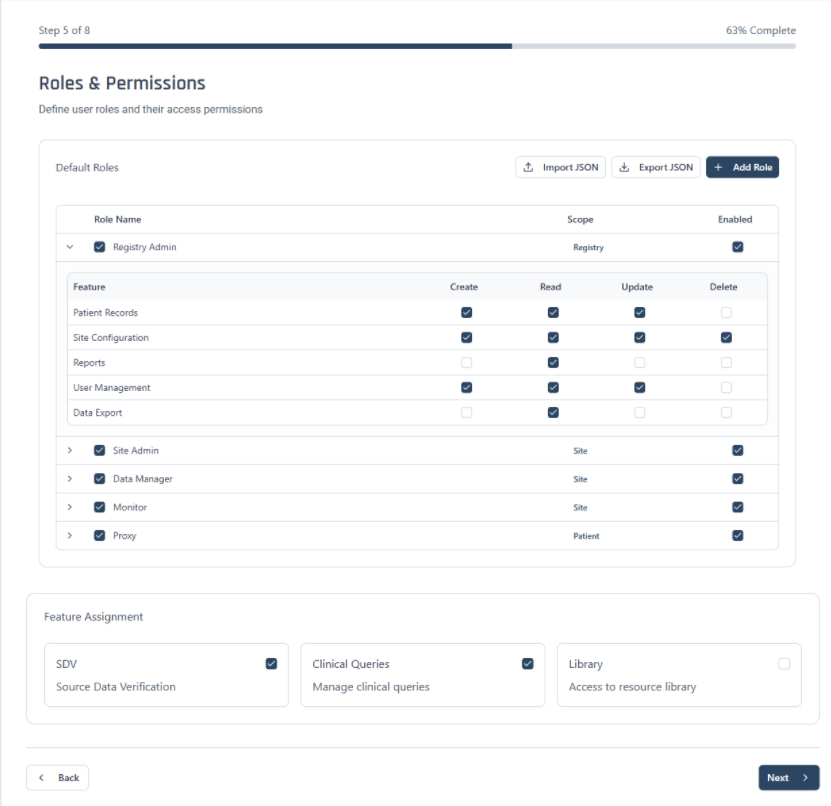
Registry setup is a web of dependencies — enabling proxy registration creates a proxy-consent requirement two modules away — and the original process relied on people simply remembering them. I specified a per-module architecture with a shared readiness model and an explicit dependency engine, written up as module PRDs so product and engineering worked from the same definitions. Each module below is one of those specs, designed to be configured independently and returned to later.
Visibility equals access — the system never grants broader access than the experience it displays.
A shared readiness model
Every module reports one of five states — Not started, In progress, Needs attention, Complete, or Blocked — so partial configuration is a first-class case, not a failure.
A dependency engine
Enabling proxy registration raises a proxy-consent dependency; self-registration makes a registration survey required. Each surfaces as an inline notice with a deep link to the module that resolves it.
Feature flags with two states
Each platform feature carries Locked/Unlocked and On/Off independently, plus Not configured. Non-destructive features switch off with configuration preserved; destructive ones stay locked, and users are told so when they enable them.
Modules that stay predictable
Summary, access, sites, onboarding, PROs, and scheduling differ in content but share structure, states, permissions, and feedback — so knowledge transfers between them.
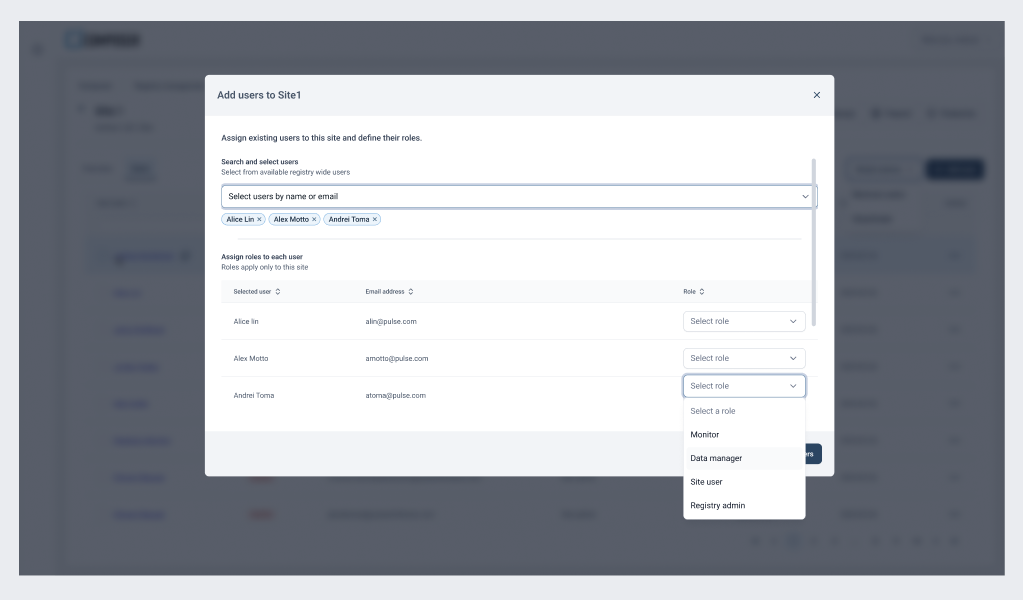
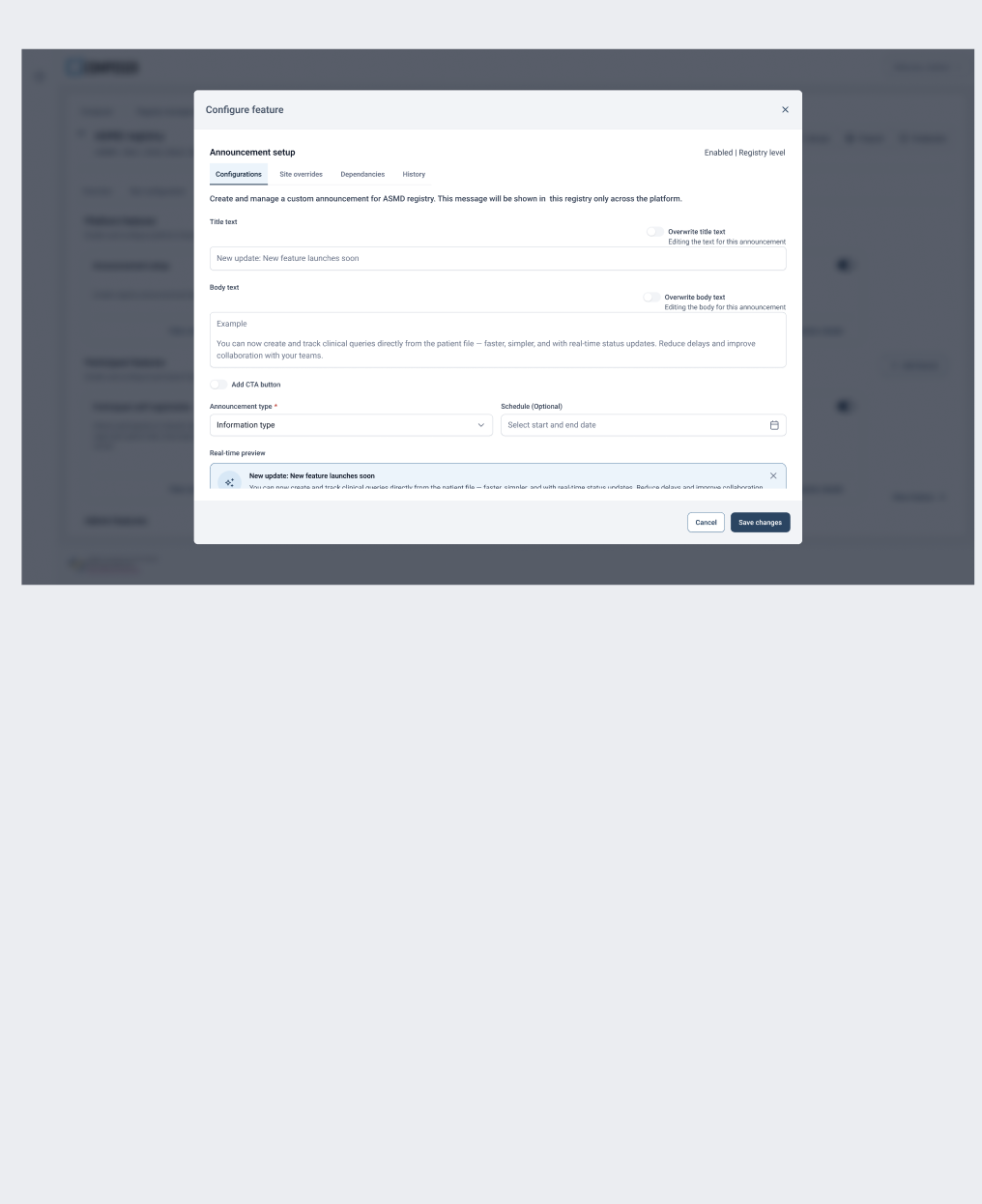
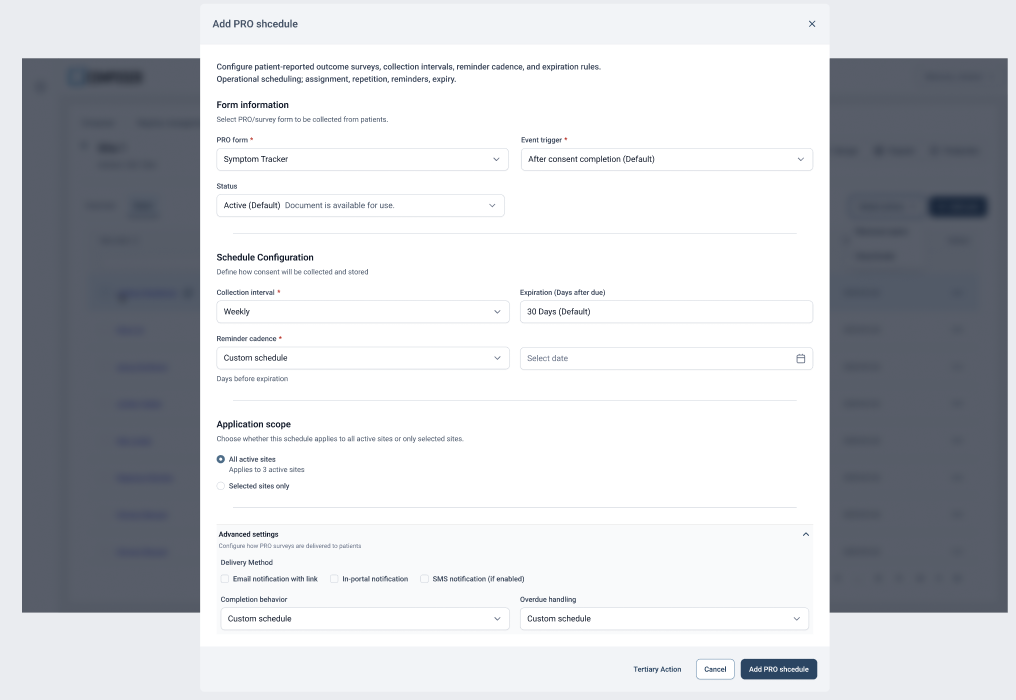
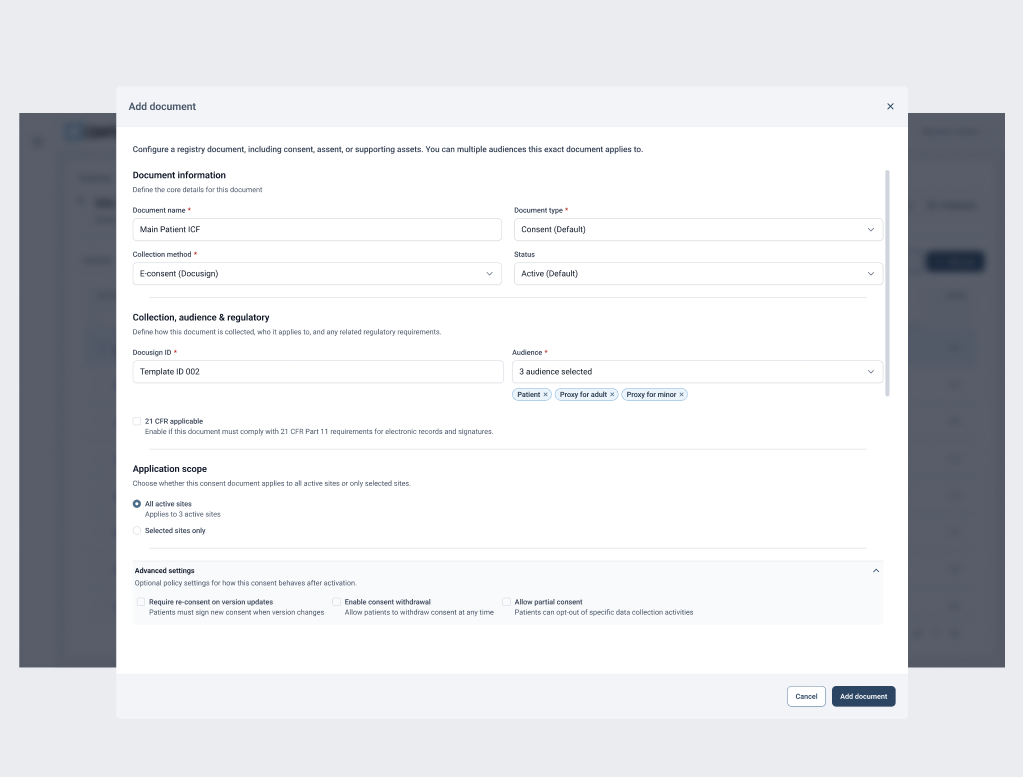
Every automatic claim grant records registry, navigation item, role, site, actor, timestamp, and grant source, so access can be audited and revoked precisely without touching grants another feature created.
Role-based rendering → access management
Same clinical data, two completely different jobs
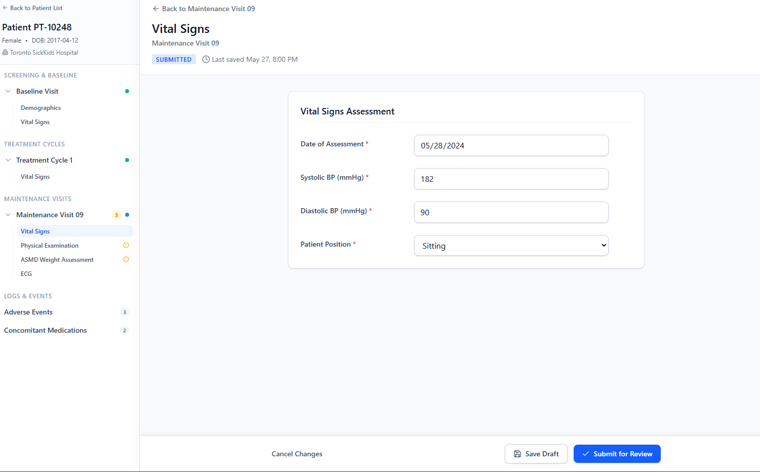
Alongside the setup work I ran a parallel study of how clinical staff actually use registry data day to day, benchmarked against major EDC platforms — Veeva Vault, Viedoc, OpenClinica, Medidata Rave. The finding reshaped more than the runtime: a Site User and a Monitor touch the same patient, visits, forms, and data, but consume and act on it in fundamentally different ways. Treating data entry and operational review as one experience is why the old interface felt heavy for everyone.
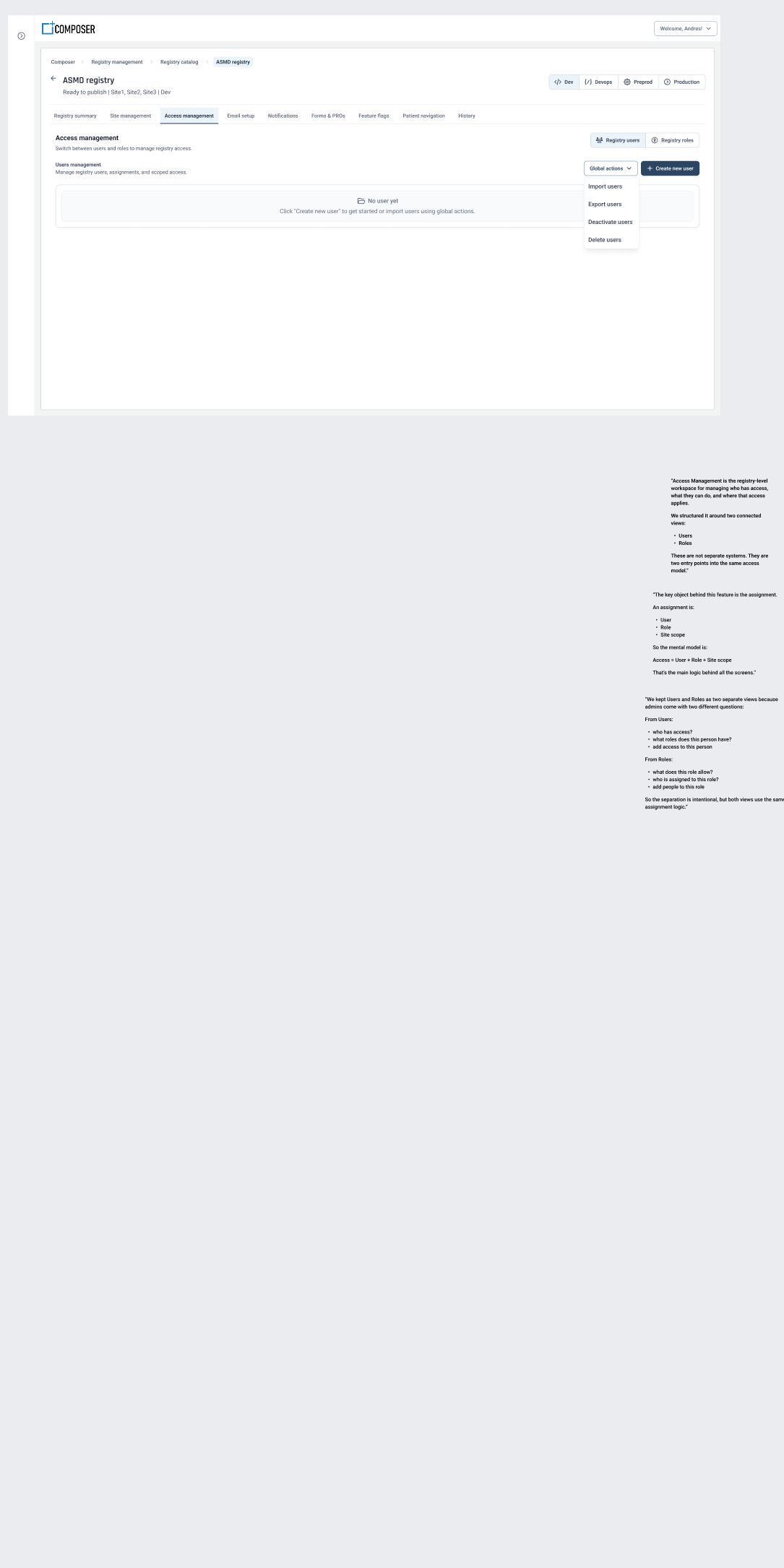
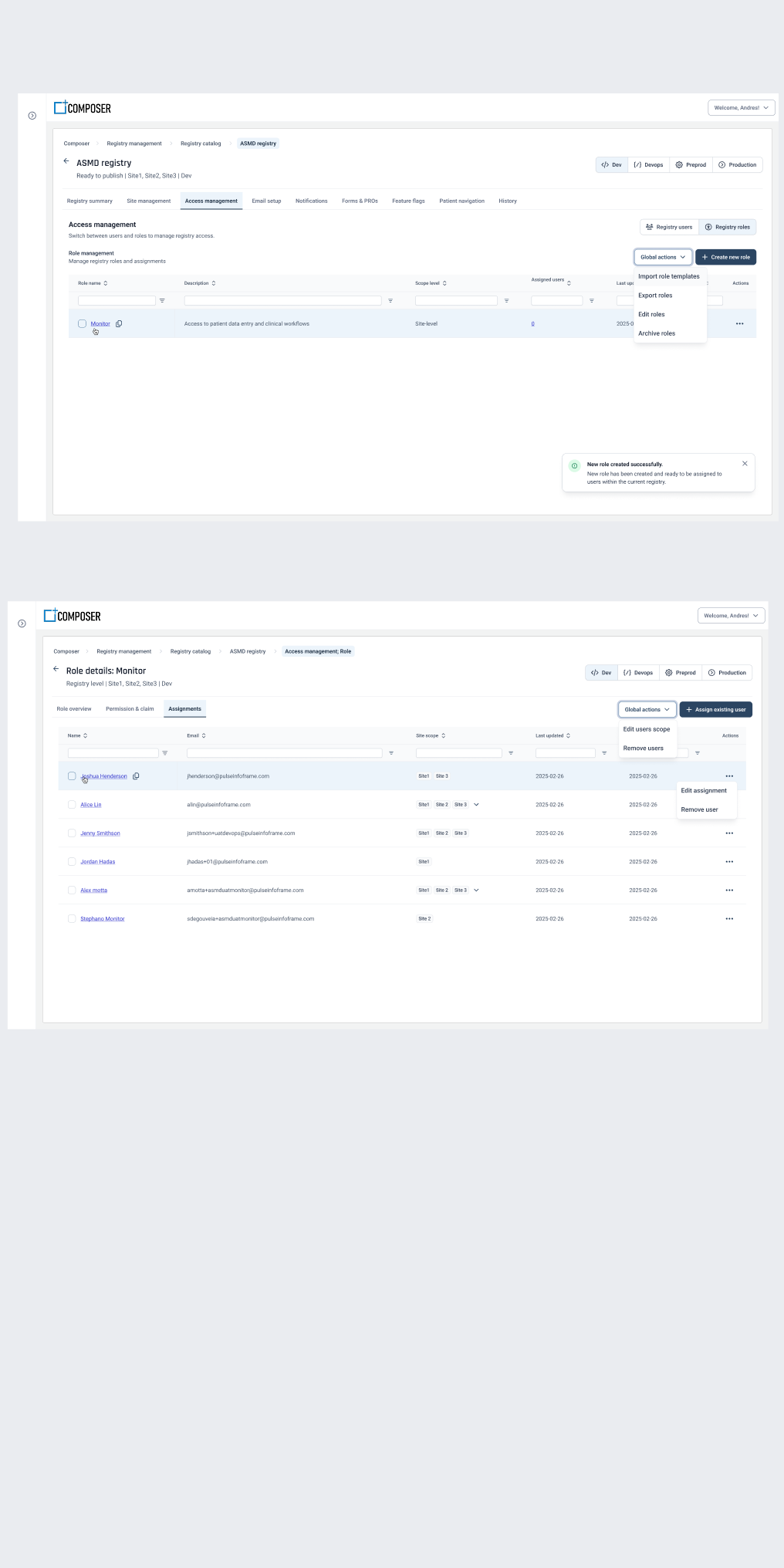
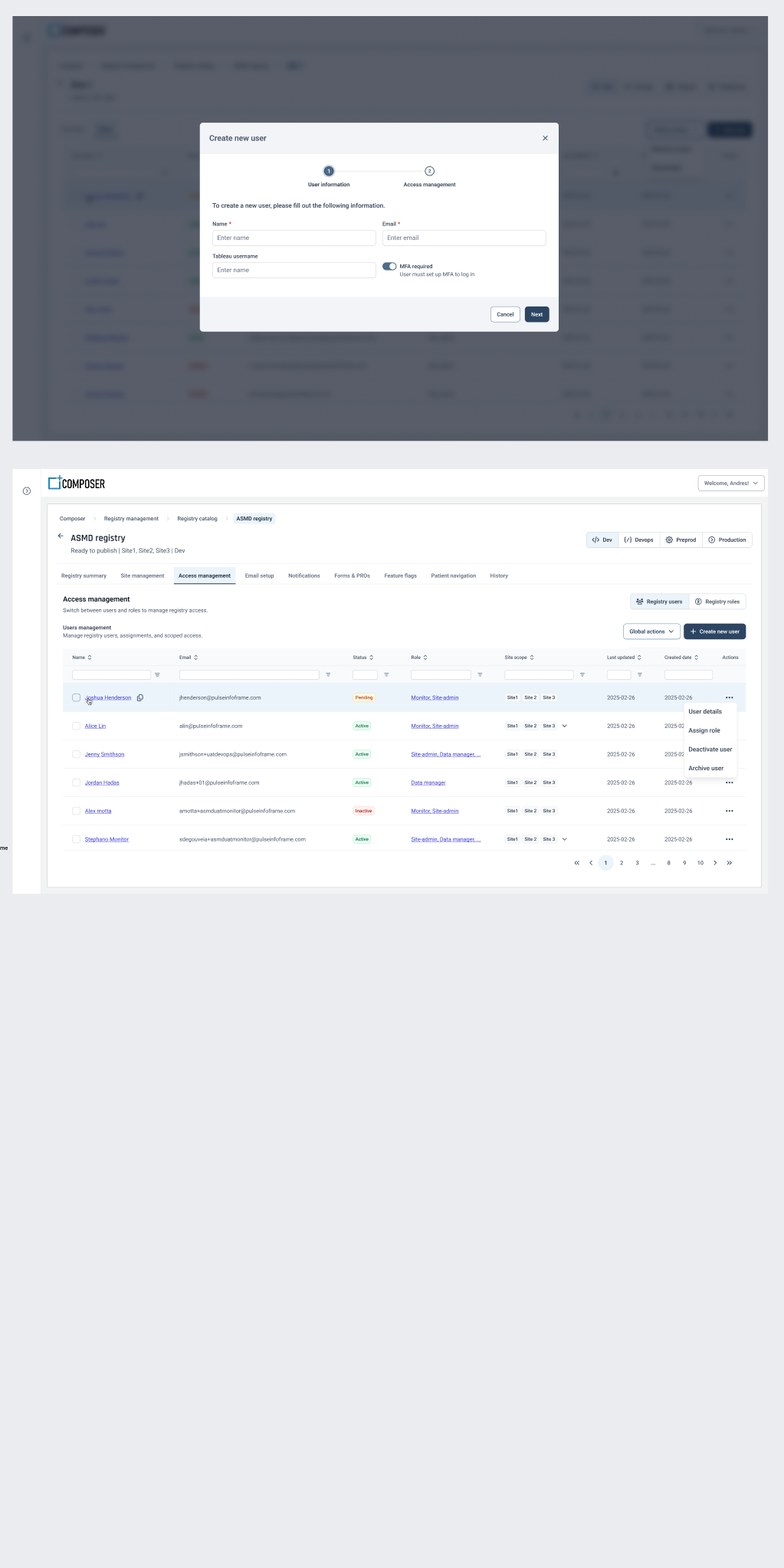
That conclusion fed directly back into registry management. If rendering has to vary by role, then roles can't be a fixed list baked into the platform — they have to be configurable per registry. It's the reason access management became its own module with roles, claims, and user assignment defined at registry level rather than hard-coded, and it's where the flexibility in the setup flow came from.
Site User asks: what do I need to complete?
Guided, safe, editable. Optimized for entry, completion, validation clarity, and query response — with read-only awareness of verification, but no monitor controls.
Monitor asks: what needs my attention?
Queue-first, analytical, high-density. Optimized for triage, SDV, changed-data review, and prioritization — read-only by default to prevent accidental edits.
So roles became configurable
Rendering varies by role, so the role model had to be owned per registry: users and roles as two entry points into one access model, with claims scoped to registry and site.
Validation & usability testing
Tested with the people who run registries
Remote moderated usability testing with real users — site coordinators, internal admins, and project coordinators — working through the setup modules. Participants consistently valued the visible progress and saved-state feedback, and reported clearer guidance when returning to a partially configured registry. Three changes came directly out of the sessions: simplified terminology throughout, a task-based progress bar, and stronger conditional logic and error messaging.
Prototypes were then validated a second time with internal stakeholders and admins, specifically to confirm logic compatibility and cognitive simplicity before the specs went to engineering.
Specification & dev handoff
Handing off something engineering could build from
Each module went to development as a written PRD rather than a Figma link: purpose, product objectives, in-scope and out-of-scope boundaries, configuration areas with paired product and UX requirements, dependency rules, the readiness model, validation rules, and permissions. I drew an explicit line between what MVP exposes and what the runtime supports internally — the widget framework ships now, the widget composer stays future scope — so technical flexibility didn't quietly become product scope.
Module PRDs with acceptance criteria
Onboarding, Consent & Documents, Feature Flags, Layout & Navigation — each with objectives, scope boundaries, validation rules, and states specified per field.
A shared widget contract
Card frame, title behaviour, loading, empty, error, and unknown-type states defined once so every widget degrades predictably and one failure never takes down a page.
Permissions matrix
Composer roles — Standard, Operational, and Pulse Administrator — mapped against view, edit, enable, publish, and disable, with publish treated as permission-gated rather than assumed.
Open decisions kept visible
Unresolved questions were tracked in the PRDs with context rather than hidden, so review conversations started from the real gaps.
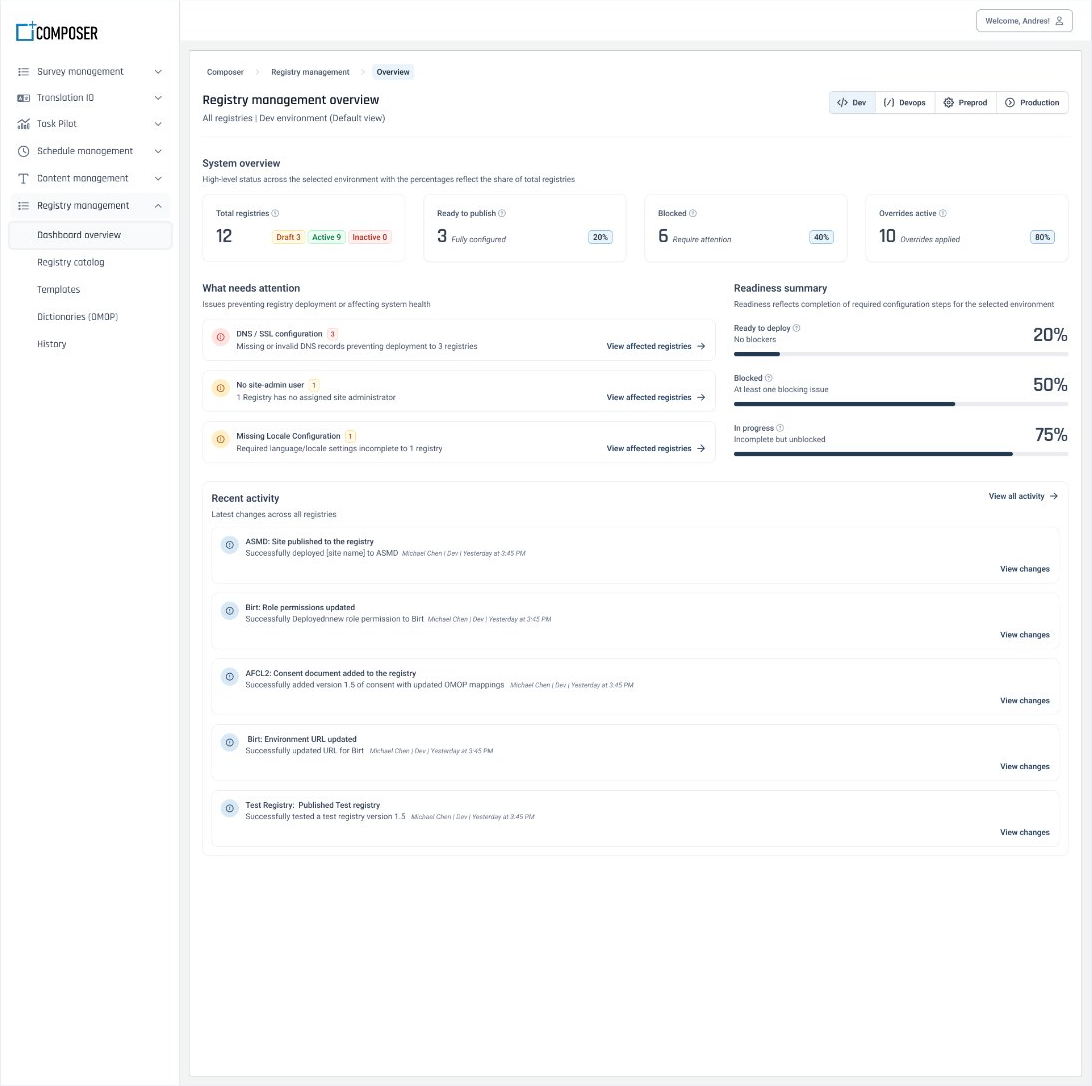
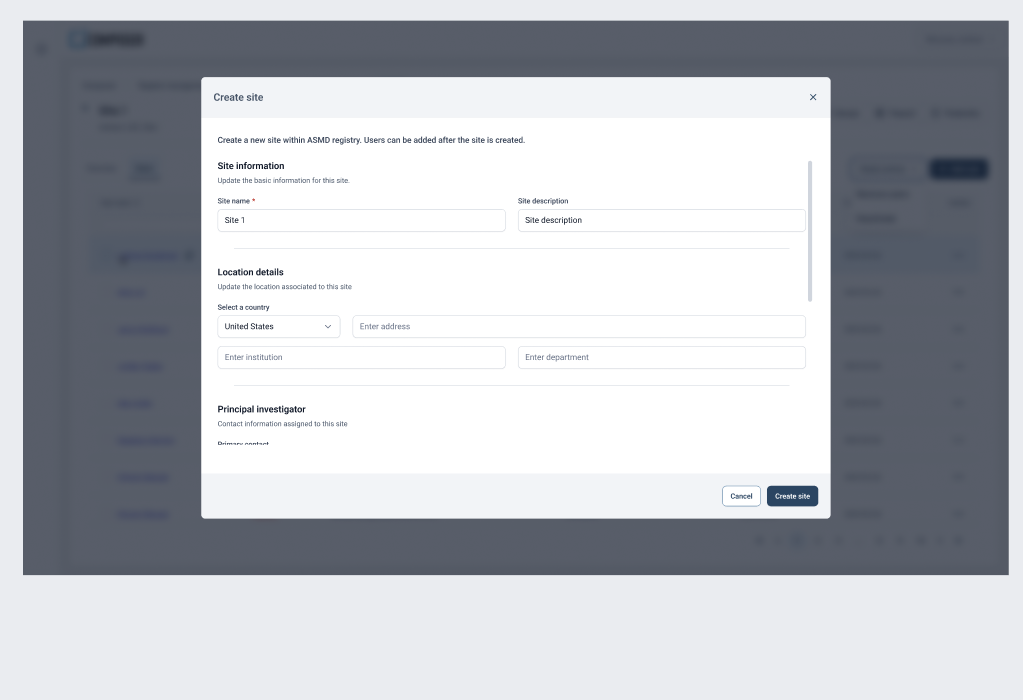
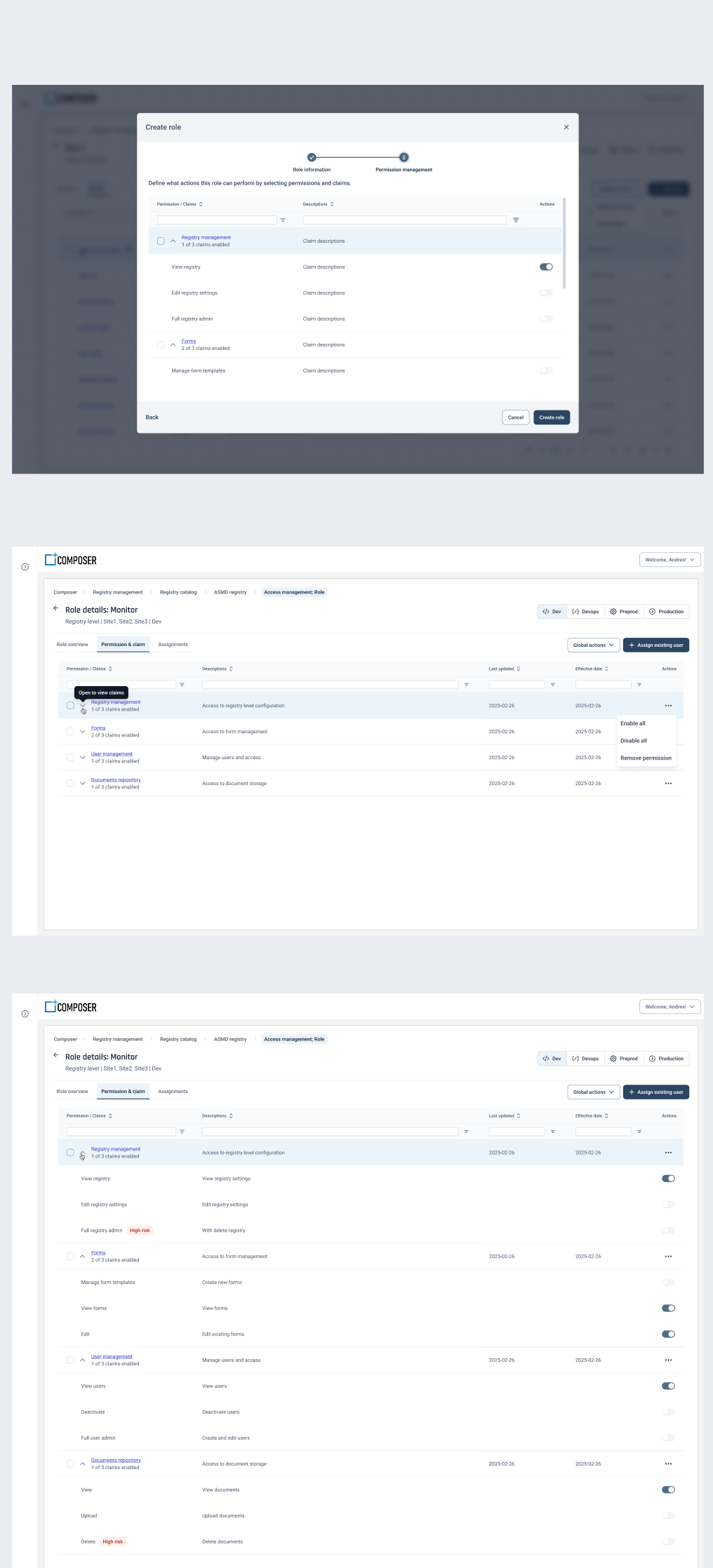
Design work was traced to engineering tickets across the HEAL epic series, and the design system picked up the new components the flows introduced — permission grid, dependency banners, timeline preview, impacts panel, and snapshot/diff viewer.
Protocol-to-Registry Configuration
A registry protocol could become the starting point for configuration, instead of another document to manually interpret
After digitizing the setup workflow, I explored where AI could reduce the manual effort that remained. Teams still interpret a study protocol, work out which setup requirements it implies, and re-enter that structure across several modules by hand. The concept reverses the direction: upload a protocol, AI interprets it and proposes a configuration, and clinical teams review and approve before anything is applied. The protocol already contains most of what a registry needs — study metadata, eligibility, arms, sites, visit schedules, assessments, consent requirements, and questionnaires. One document could populate several modules at once.
AI should translate protocol meaning into product configuration — not simply summarize the document.
Upload protocol
PDF, Word, or structured template. The system first checks format, readability, version, and whether the expected sections can be detected.
Interpret the document
AI identifies study concepts — objectives, population, inclusion and exclusion criteria, arms, schedule of events, sites, assessments, consent. The protocol stays the source of truth.
Map to registry modules
Study title → Registry Metadata, cohorts → Study Arms, schedule of events → Visit Configuration, assessments → Data Element Groups, questionnaires → Survey Builder.
Review and approve
A draft, never a silent change. Each suggestion carries its protocol source, a confidence level, any conflict with existing configuration, and Accept / Edit / Reject / Skip.
The flow, end to end: Protocol → AI interprets and structures → Configuration draft → Human review → Approved modules.
Responsible AI requirements
AI drafts the configuration; clinical teams make the decision
In a regulated environment the interesting design problem isn't extraction accuracy — it's what the interface owes the person who has to sign off. Confidence is used to direct attention rather than to make decisions: high confidence means the value is explicit and maps cleanly, medium means it needed interpretation, and needs-review means the protocol is ambiguous, conflicting, or doesn't map to the product model at all. Each state tells a coordinator where to look first, not what to trust blindly.
Human approval before any change
AI can propose; only a person can apply. Nothing reaches registry configuration without explicit approval.
Source traceability
Every extracted value links back to its protocol section, so nobody has to ask where a suggestion came from.
Preserve existing work
Fill empty fields, suggest changes to populated ones, never overwrite automatically.
Explain conflicts
Protocol says Week 8, registry says Week 6 — surface the disagreement and require a decision rather than silently picking one.
Make processing visible
Uploading → Reading → Extracting → Mapping → Validating → Ready for review, so a long-running job never looks like a stall.
Handle uncertainty explicitly
Distinguish found, inferred, missing, and conflicting. In a clinical setting, collapsing those into one state is a safety problem.
I'd phase it rather than automate everything at once: pre-fill high-confidence metadata first, then propose structure, then interpret relationships and conditional logic, and eventually run cross-module validation that compares configuration back against the protocol — flagging, for example, that a Week 12 quality-of-life assessment is required but no Week 12 questionnaire is configured. The measure of success isn't how much AI can configure on its own; it's how much duplicate interpretation it removes while keeping confidence, traceability, and control with the clinical team.
Reflection
The strongest decision was defining the administration model before optimizing individual modules. Enterprise platforms get hard to use when every new capability introduces a new mental model — and the fix isn't making every module identical. It's making their structure, states, navigation, permissions, and feedback predictable enough that an administrator can transfer what they learned in one module to the next. The other lesson was about where the real work sits. Mapping ten stages of invisible backstage handoffs, then deciding which dependencies the system should enforce rather than expect people to remember, is what turned a developer-driven process into something a registry admin can run alone. The interface was never the hard part.
Outcome
Cross-registry orientation
One place to discover registries, read their state, and enter the right workspace and environment.
Modular administration
Each registry managed through a predictable workspace rather than a growing set of disconnected settings pages.
Configurable experiences
Navigation, dashboards, access, sites, onboarding, PROs, and scheduling reflect registry needs within governed limits.
A foundation to extend
Shared readiness, dependency, and permission patterns let future modules reuse decisions instead of reinventing them.